
I bet some of your users use Snagit every day.
That means it has to work as expected, or else productivity comes to a screeching halt as they relentlessly peruse the application settings within Snagit, or even worse, call the helpdesk for assistance.
That’s where PolicyPak comes in. We enforce and lock down the optimum settings values that you, the administrator, want them to have. PolicyPak sets and enforces expectations for your users’ applications, so that they get the same experience, every time they launch it.
Ensure your Snagit settings are dictated and ensured using PolicyPak. Get those settings out there using Group Policy, SCCM or your own management tool.
Check out this video to see how it’s done using Group Policy:


So that users see this.

With PolicyPak, you’re the one in control.
Besides, once you’re using PolicyPak to manage Snagit, you’ll also get to manage all your other enterprise desktop applications the same way: Flash, WinZip, Firefox, and any custom applications you have. They’re 100% included – absolutely free.
It’s all included when you’re a PolicyPak Professional customer.
PolicyPak was designed by Microsoft MVP, Enterprise Mobility Jeremy Moskowitz – who “wrote the book” on Group Policy, runs GPanswers.com, and lives and breathes Group Policy and enterprise software deployments and desktop lockdown.
When you’re ready to get serious about managing Snagit, PolicyPak is ready for you.
Manage TechSmith’s SnagIT with PolicyPak video transcript
Hi,everybody. This is Jeremy Moskowitz, Microsoft MVP, Enterprise Mobility and Founder of PolicyPak Software. In this video, we’re going to learn how to manage TechSmith’s Snagit using Group Policy and PolicyPak. I’m a big fan of Snagit, so I’m very happy that we’re able to create a PolicyPak for it.
This is the experience that a regular user would have as soon as they log on. This is a one-off installation for me. But if you have one, five, ten, a thousand or ten thousand copies of Snagit in your enterprise and you’re employing it using the enterprise deployment technologies that you might have, you probably want to manage Snagit in a more refined way.
For instance, you probably don’t want this “Registration” dialogue to come up at first start by way of example. Let’s actually go over some other options as well. For instance, you probably want to remove the “Check for Upgrade.” That’s probably pretty important. You don’t want people to be able to check for upgrade.Maybe you also want to disable “Register Snagit Online” like we just talked about and maybe some other options.
If we go to “Tools/Program Preferences…,” the unfortunate truth is that while this is a killer application, unfortunately users can get caught up in some of the options in here, get confused and lose their way, and that means a help desk call for you to run down there and fix it. Now if you could only magically deliver the settings and lock them down so users can’t work around it, well then you’d have something. That, my friends, is what PolicyPak does.
Any setting that’s available here in any of these tabs is something that PolicyPak can do. We’ve figured out how to deploy all of these settings using PolicyPak and also lock them down. If anything here is important to you, like removing “Enable automated update checking,” that might be important to you, we can do that. Or, for instance, saying “No, thank you.” at the corporate level to improving Snagit. We can do that as well.
Let’s go ahead and close this out, and let’s go ahead and try to do those things using PolicyPak real fast. I’ll go ahead and close that out, “Exit Snagit.” We’ll go over to my Group Policy Management Console.
Before I do that, I do want to show that the folks at TechSmith have a really great Snagit “Enterprise Installation Guide.” I really encourage you to read through that. It shows you how to deploy Snagit using, say, things like Group Policy or SMS or whatever technology you want to us. It also gives you some advice on how to, when you deploy it, inject some settings into your initial deployment.
Now if you want to go through all that, well fantastic. That’s exactly what we’re going to do with PolicyPak. But even then, let’s say you do go through the motion of setting up what’s called an MST file and guaranteeing or delivering those settings immediately upon software delivery. What happens when a user works around that setting? Well, that is what PolicyPak can do. We can deliver the setting and guarantee that users won’t work around it.
While we’re here, I also want to point out that there are a handful of “Features that Can Be Disabled” that TechSmith provided. We’ve included these inside our PolicyPak, and I’m going to show those to you. But what PolicyPak additionally brings to the table is being able to deliver and disable any setting inside of Snagit. Not just these handful of settings, every setting. That’s the big deal.
Let’s go ahead and let’s start with our “PreConfigured PolicyPaks”here. You can see we’ve got Snagit. There are actually two pieces to Snagit. There is the “pp-Snagit Main Application.dll” and also the “pp-Snagit-Editor.dll.”
What we’re going to is copy those files into “C:\Program Files\PolicyPak\Extensions.”I’ll bring that up. What you’re going to do is simply take our preconfigured, precompiled PolicyPaks and “Copy here” into your management console. It’s just that easy.
When you’re ready to go, we’re going to go to our “East Sales Users” by way of example and “Create a GPO.”We’re going to call this “Manage Snagit using Group Policy and PolicyPak.”
We’ll right click over, click “Edit…” here and we’ll dive down under user side “PolicyPak/Applications/New/Application.”I’ve got a lot of different applications I could manage. What we’re after here is “PolicyPak for Snagit Main Program.”
Let’s go right for the jugular. Well, actually, remember we talked about how a user could get caught up in “Program Options,” so we want to make sure that they can’t. If there’s anything you want to configure here, feel free. You can check or uncheck things if you’re so inclined.
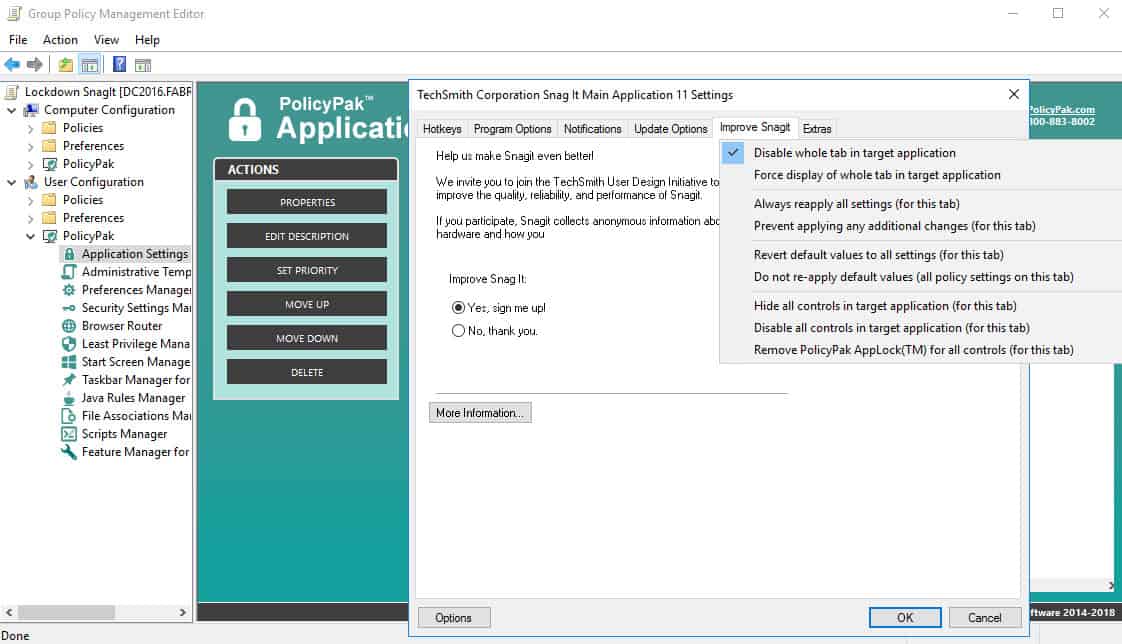
While we’re here, we can right click and “Disable whole tab in target application,”make it so that the user can’t click in the tab and therefore get trapped in these little nooks and crannies.
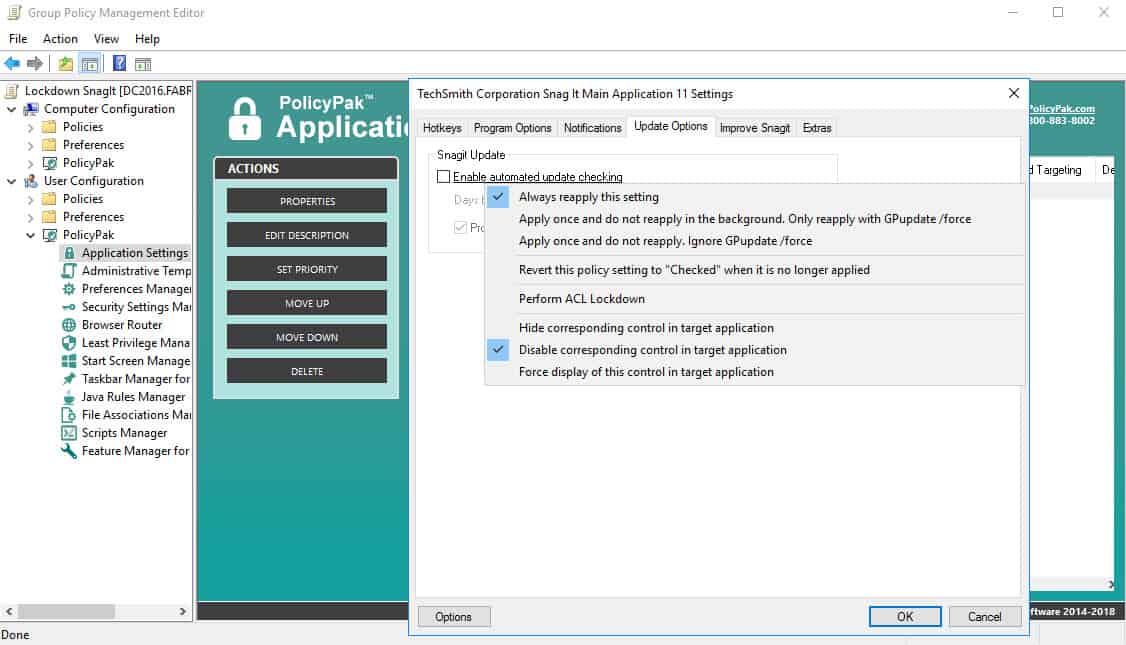
Let’s go over to “Update Options.”Maybe we want to uncheck “Enable automated update checking.” If you’re deploying from a corporate level, you’re probably deciding when the updates should happen, not your five or ten thousand end users. While we’re here, we can also right click and “Disable corresponding control in target application”again. There’s no way to really do this using the stuff out of the box.
If we were to go to “Improve Snagit,” we can say “No, thank you.” and also right click and “Disable corresponding control in target application”so a user can’t mess that up or change that setting.
If we go to “Extras” here, the thing that we probably want to do is to “Disable ‘Register Snagit’ online dialogue.” OK, so you can see that we’re doing that right there, disabling the register for Snagit online.
These are the handful of settings that Snagit provides. These are all the additional settings that PolicyPak provides. In a corporate environment, that’s what we’re here for. We’ll go ahead. We’ll click “OK.”
Let’s go back over to our target machine here. I’m going to run a command prompt and run “gpupdate.” Now you’re going to get these settings if you log on the first time. We’re going to guarantee these settings when a user logs on. In the background, refresh, because Group Policy naturally updates every 90 minutes or so. If they change jobs or get a new computer or a new laptop, we’re always guaranteeing the settings so users can’t screw it up.
There we go. We’re done with GPUpdate. Let’s go ahead and run “Snagit 10” here. OK, now that we’re running, actually we’ll go to first to “Help.” You’ll see there’s no more “Register Snagit”anymore there. That’s one of the things that we just took away.
If we go to “Tools/Program Preferences…,” well we can see here, cool. “Program Options,” no way for a user to get into that little nest of settings there. That’s excellent. That’s pretty cool.
Go to “Update Options.” Look at that. We’ve unchecked and also locked down the “Enable automated update checking”for all of these users. Fantastic. Go to “Improve Snagit” and we’ve also delivered the setting and set it to “No, thank you.” and also locked it down.
There’s just no way to do this using the handful of settings that TechSmith provides. That’s what PolicyPak does, helping out enterprise deployments of software just like this.
Now P.S., as you probably already know, Snagit also has an Editor, and the Editor also has some settings. If you go to “Snagit Editor” and go to “Editor Options…,”you’ll see that there are a bunch of settings here under “General,” a bunch of settings under “Advanced” and there’s also “Improve Snagit” here again as well.
What we’re going to do just for fun is I’m going to just set one or two of these options here for you. For instance, I’m going to show using PolicyPak how I’m going to take the slider and slide it from “More often” to “Less often.”
Also, this might be kind of confusing for the user under “Backup/Restore Automatically Stored Files…” this “Backup/Restore Snagit Library.”I don’t know, this might be something for power users to use, but it could be confusing for the average user. If you want to remove a button from the Snagit Editor UI, the only way to do that is through PolicyPak.
Let me go ahead and we’ll leave this here at “More often.” We’ll leave the button there. There’s nothing we can do here. We’ll go ahead and close that out. We’ll make sure Snagit is fully closed here.
We’ll go ahead and head back over to our Group Policy editor. Now remember we dragged and dropped both of our PolicyPak preconfigured Paks in. So we can go to “PolicyPak/Applications/New/Application/PolicyPak for Snagit Editor.”
Let’s go ahead and go right to, well, for “Improve Snagit” let’s just right click and “Disable whole tab in target application.”Now it’s not really a tab actually. It’s kind of like a column thing, but you’ll see what happens if we disable the whole tab.
We’ll go back to “Advanced” here. I’m going to slide this all the way to “Less often.” I think that might be the way to go. I can also right click and “Disable corresponding control in target application”so this slider will be not available for the user to manipulate. It will be locked into the “Less often” position.
Same thing with “Backup/Restore Automatically Stored Files…” We talked about this. If I don’t want the button to appear at all, I can right click and “Hide corresponding control in target application,”literally remove the button. That’s it. Let’s leave that where it is.
We’ll go back to our client machine. We’ll run “gpupdate.” As soon as Group Policy is updated, we can rerun Snagit Editor now and see our settings get delivered. There’s just no way to do this out of the box. That’s why we developed a PolicyPak for it.
Now if we go to the “Snagit 10 Editor,” we’ll dive down under the “Editor Options…” The first thing we want to do is go to “Advanced.” Look at that. We’ve slid it over to “Less often” just like we said. That button that we saw earlier for the “Backup/Restore Automatically Stored Files…,” it’s just totally gone out of the UI. Nothing more to confuse the user, and you could do that for any of the items anywhere in Snagit that we support.
The last thing I wanted to show you was that “Improve Snagit.”I said “Disable whole tab in target application.” It’s not really a tab, but if you click on “Improve Snagit,” watch what happens. I’m going to show you that again. I’m going to click on it, and it just doesn’t let you click on that at all. You can do that for any or all these tabs if you’re so inclined.
If you want to truly deploy the settings that are important for Snagit and lock them down as you just saw for both the Snagit Main Application and the Snagit Editor, well that is what PolicyPak for Snagit will do for you.
When you’re licensed for PolicyPak, you’re not just licensed for one Pak, you’re licensed for all the Paks. If you get excited about managing this one application, you might want to manage things like Firefox or Flash or Java or Lync or any of your other corporate applications.
With that in mind, thank you very much. Remember with PolicyPak, what you set is what they get.